File Shield
Watches Desktop, Downloads, Documents, Temp and startup folders. New or changed files are scanned the moment they arrive.
Native Windows security, without the noise
AspisGuard pairs real-time file monitoring with a signature and behavior engine, an encrypted quarantine vault, and a deep PC cleaner — all running locally on your machine.
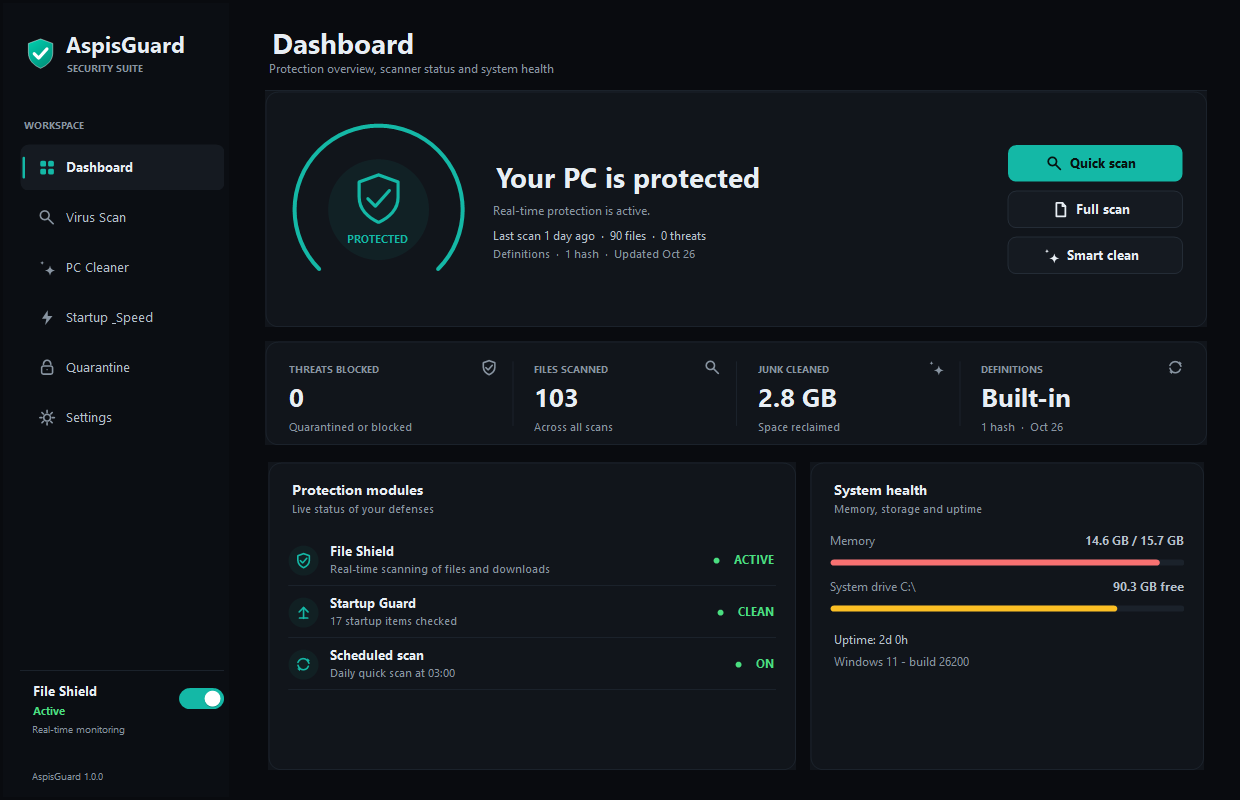
Actual AspisGuard dashboard · Windows 11
Protection
Six practical defenses, built into one compact Windows app. No dashboards full of noise, no cloud dependency, no upsell.
Watches Desktop, Downloads, Documents, Temp and startup folders. New or changed files are scanned the moment they arrive.
SHA-256 hashes and wildcard byte patterns identify known files without uploading a single byte to a server.
Catches encoded PowerShell commands, macro auto-runs, ransomware recovery tampering, disguised extensions, and suspicious startup chains.
Threats move into a machine-bound vault using AES-256-CBC and HMAC-SHA256. Restore or destroy them when you decide.
Reclaims temporary files, browser caches, crash dumps, old logs and update leftovers. Passwords, history, and personal files stay untouched.
Review everything that launches with Windows, back up entries before disabling them, and flag suspicious Run commands.
Scanner
Quick, full, or folder scans use signatures and behavior rules in a single pass. Findings are explained in plain English before you act.
1 file scanned · 0.1 s
C:\Users\Public\Downloads\Statement_2026.pdf.exe
Disguised double extension · executable in a temporary location
14 categories selected · 3,394 files
PC Cleaner
Analyze first, then clean only what you select. AspisGuard measures every category and skips files that are currently in use.
How it works
One executable, no installer and no account. Windows will ask for administrator rights so AspisGuard can scan protected locations.
Quick scan checks the usual hiding places. Full scan checks every fixed drive. Findings can be quarantined, deleted, or ignored.
It continues watching in real time from the tray, automatically quarantining confirmed threats while you use your PC.
Security model
No cloud scanning. No account. No telemetry. Everything that matters stays on the PC, under your control.
Hashes, byte patterns, behavior rules, and archive inspection all run on the machine. Files are never uploaded.
Quarantine uses AES-256-CBC with an HMAC-SHA256 integrity check and a key protected by Windows DPAPI.
Import your own definitions, set exclusions, inspect logs, and back up startup entries before disabling them.
FAQ
No fine print theatre. Here is how the app actually behaves.
Yes. This local build is free to run. There is no account, subscription, upsell, or telemetry.
No. AspisGuard is an independent scanner and does not disable Windows security. Keep Windows and Defender updated as usual.
No. Scanning and quarantine are local. The only network request happens if you configure a definitions update URL and click check.
Yes. The built-in engine and local rules work without a connection. Definition updates are optional.
To inspect protected system locations, remove quarantined files, read startup entries, and empty caches that require elevation.
No antivirus does. AspisGuard combines signatures, behavior rules, and real-time monitoring. Keep Windows updated and treat unknown files with care.
This is an unsigned local build, so Windows SmartScreen may warn. The SHA-256 checksum below is published so you can verify the exact file.
Exit from the tray, delete the program folder, remove %ProgramData%\AspisGuard, and disable “Start with Windows” first if you enabled it.

Ready when you are
One executable. No installer. No account. Just local protection for Windows.
199cb69bb4c827ad3cb52e7d31a2b75fdf14b7ea233b63dee16d9cb11686a495
Unsigned local build · Windows SmartScreen may ask for confirmation · Administrator rights required for full protection.